
Last updated on
Nov 6, 2026

PH PRC REG Form 001 - Lucena City 2007-2026 free printable template
We are not affiliated with any brand or entity on this form

Fill out
Complete the form online in a simple drag-and-drop editor.

eSign
Add your legally binding signature or send the form for signing.

Share
Share the form via a link, letting anyone fill it out from any device.

Export
Download, print, email, or move the form to your cloud storage.
Why pdfFiller is the best tool for your documents and forms


End-to-end document management
From editing and signing to collaboration and tracking, pdfFiller has everything you need to get your documents done quickly and efficiently.
Accessible from anywhere
pdfFiller is fully cloud-based. This means you can edit, sign, and share documents from anywhere using your computer, smartphone, or tablet.
Secure and compliant
pdfFiller lets you securely manage documents following global laws like ESIGN, CCPA, and GDPR. It's also HIPAA and SOC 2 compliant.
What is PH PRC REG Form 001 - Lucena City
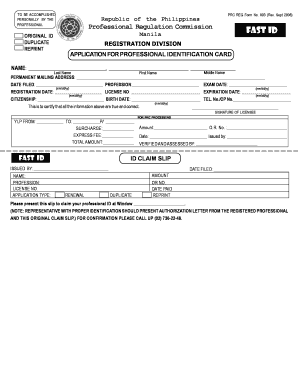
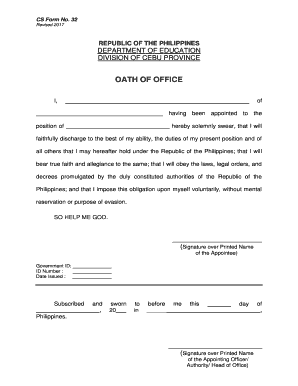
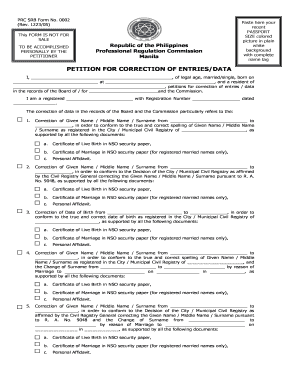
The Philippines PRC Professional Oath Form is a government document used by professionals in the Philippines to register for a professional license and take an oath of allegiance to the Constitution.
pdfFiller scores top ratings on review platforms




So far, I'm surprised how intuitive this is.
Excellent. Super easy to use and makes filling out PDFs a breeze, saving time and effort.
Who needs PH PRC REG Form 001 - Lucena City?
Explore how professionals across industries use pdfFiller.

PH PRC REG Form 001 - Lucena City is needed by:
-
Licensed professionals applying for PRC registration
-
Notaries required to sign the document
-
Recent graduates seeking professional certification
-
Individuals upgrading their professional licenses
-
Members of regulated professions in the Philippines
Comprehensive Guide to PH PRC REG Form 001 - Lucena City
What is the Philippines PRC Professional Oath Form?
The Philippines PRC Professional Oath Form, specifically PRC REG Form No. 001, is a vital document in the professional licensing process. It serves as a declaration of allegiance to the Philippine Constitution and signifies a commitment to uphold ethical standards in various professions. Completing this form is not only a requirement for professional registration but also carries significant legal implications for ethical compliance across all fields.
This form plays a crucial role in maintaining the integrity and professionalism of licensed practitioners. By taking the oath, professionals affirm their dedication to ethical practices, which is essential for the trust and safety of the public they serve.
Purpose and Benefits of the Philippines PRC Professional Oath Form
Filling out the PRC Professional Oath Form provides numerous advantages for professionals in the Philippines. This formalization allows applicants to affirm their responsibilities as outlined in the Philippine Constitution, emphasizing their role in upholding the dignity of their respective professions.
By completing the oath, professionals can facilitate their license approval, thereby enhancing their career opportunities. Moreover, reinforcing ethical standards through the oath is crucial for professional credibility and public trust.
Who Needs the Philippines PRC Professional Oath Form?
The PRC Professional Oath Form is mandatory for a wide range of professionals across various fields. Individuals required to submit this form include those in vocations such as engineering, architecture, healthcare, and law. Specific roles, particularly notaries, also mandate signing the oath to validate their professional authority.
Compliance with this requirement is essential for career advancement, as it reinforces the practitioner's commitment to ethical conduct within their professional journey.
Eligibility Criteria for the Philippines PRC Professional Oath Form
To qualify for the PRC Professional Oath Form, several eligibility criteria must be met. Professionals must complete general requirements which include holding a valid degree relevant to their profession. Additionally, necessary documentation such as examination results and identification must be provided before completing the form.
This form requires accurate personal data and examination details to ensure proper registration. All fields must be diligently filled to avoid processing delays and ensure compliance with PRC standards.
How to Fill Out the Philippines PRC Professional Oath Form Online (Step-by-Step)
Filling out the Philippines PRC Professional Oath Form online can be accomplished easily with pdfFiller. Follow these steps:
-
Access the PRC Professional Oath Form via pdfFiller’s platform.
-
Complete each field carefully, including personal information and examination details.
-
Ensure you sign the form electronically or by hand as required.
-
Double-check all entries for accuracy before finalizing.
-
Submit the completed form as directed by the PRC guidelines.
Utilizing pdfFiller streamlines the form completion process, allowing for easy editing, signing, and submission.
Common Errors and How to Avoid Them When Filling Out the Form
When completing the PRC Professional Oath Form, professionals often encounter common errors that can lead to rejections. These include inaccuracies in personal data, such as name spelling and identification numbers. To avoid such mistakes:
-
Carefully verify all personal information entered on the form.
-
Ensure that the signature field is correctly filled, whether digitally or by hand.
-
Follow best practices for notarization to avoid issues with form acceptance.
Prior to submission, it’s advisable to double-check all information for completeness and correctness to prevent delays.
How to Notarize the Philippines PRC Professional Oath Form
Notarization is a vital step in the process of validating the PRC Professional Oath Form. It ensures the authenticity of the signature and confirms the identity of the signer. Here’s how to notarize the form:
-
Visit a licensed notary public with your signed form and required identification.
-
Request notarization, ensuring all details are visible and legible.
-
Consider the option of digital signatures where permitted, as they can expedite the process.
Understanding the importance of notarization will help reinforce the legitimacy of the professional oath.
Submission Methods and What Happens After You Submit
Upon completing the PRC Professional Oath Form, there are several ways to submit it to the PRC. The professional can choose to submit via mail, in person, or through online platforms where applicable. Once submitted, professionals can anticipate the following:
-
Processing times which may vary based on volume of applications.
-
Confirmation of receipt from the PRC to track application status.
-
Steps to take post-submission to monitor application progress effectively.
Being aware of these procedures ensures a smooth transition from submission to license approval.
Security and Compliance for the Philippines PRC Professional Oath Form
Handling the PRC Professional Oath Form requires a focus on security and compliance, especially given the personal data involved. Professionals should prioritize using secure platforms when completing and submitting sensitive documents.
pdfFiller, for instance, incorporates advanced security features such as 256-bit encryption to protect your information. Understanding the measures in place ensures your data privacy and integrity during the submission process.
Experience Hassle-Free Form Filling with pdfFiller
Utilizing pdfFiller for managing the PRC Professional Oath Form offers a streamlined and user-friendly experience. With features designed for ease of use, professionals can navigate form completion efficiently.
pdfFiller allows users to edit, eSign, and convert documents seamlessly, ensuring a hassle-free process. By leveraging these capabilities, professionals can focus on their core responsibilities without the stress of paperwork.
How to fill out the PH PRC REG Form 001 - Lucena City
-
1.Access the form by visiting pdfFiller and searching for 'Philippines PRC Professional Oath Form'.
-
2.Open the document in the pdfFiller interface to view fillable fields and instructions.
-
3.Gather necessary information including personal details, examination results, and professional data before starting.
-
4.Click on each field to enter the required information, such as your name, profession, and the date of the oath.
-
5.Use the instructions provided within the form to ensure all sections are completed accurately.
-
6.Once all fields are filled, review the form for completeness and accuracy, checking for any required signatures.
-
7.Finalize the form by clicking on the 'Done' button to save your progress.
-
8.Choose the option to download or share the completed form, or directly submit it through pdfFiller to the Professional Regulation Commission.

Who is eligible to use the PRC Professional Oath Form?
The PRC Professional Oath Form is intended for professionals in the Philippines who need to register their licenses and comply with the regulations set by the Professional Regulation Commission.
Are there deadlines for submitting the PRC oath form?
While specific deadlines may vary, it's advisable to submit the PRC Professional Oath Form as soon as possible after successfully completing your professional examination to avoid registration delays.
Can the form be submitted electronically?
Yes, you can submit the completed Philippines PRC Professional Oath Form electronically through pdfFiller or by following the submission guidelines provided by the Professional Regulation Commission.
What supporting documents are needed with the form?
Typically, you will need to provide a valid identification card, examination results, and any relevant certifications when submitting the PRC Professional Oath Form.
What are common mistakes to avoid when completing the form?
Common mistakes include missing signatures, incorrectly filling out personal information, and failing to notarize the document where required. Always double-check your entries before submission.
How long does it take to process the application after submission?
Processing times can vary, but applicants should generally expect to receive their professional ID within several weeks after submitting the PRC Professional Oath Form and all requisite documents.
What should I do if I encounter issues accessing the form on pdfFiller?
If you experience difficulties, ensure you have the correct link or search for the form name within pdfFiller. Alternatively, contact their support for assistance or check for browser compatibility issues.




Related Catalogs
Get the latest insights from our blog


If you believe that this page should be taken down, please follow our DMCA take down process
here
.
This form may include fields for payment information. Data entered in these fields is not covered by PCI DSS compliance.